Python typing
The Duck Test
The concept of "duck-typing" is a central concept in Python. The name comes from the Duck test:
"If it looks like a duck, swims like a duck, and quacks like a duck, then it probably is a duck"
This again is a reference to the "Canard Digérateur", or "The Digesting Duck", a mechanical duck built by Jacques de Vaucanson in 1739:
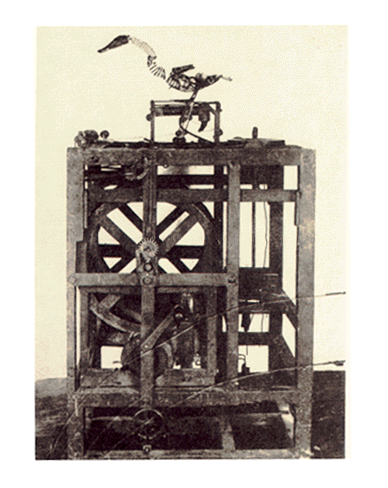
The duck was designed to look like it ate a mixture of water and grain, digested the food, and then excreted the remains. In reality, the duck excreted a pre-made mixture of bread crumbs and green dye in a process that was not connected to the ingestion process.
Python – a duck-typed language
Similarly, in Python, the type of an object is determined dynamically - by its behavior - rather than by definition. This is in contrast to statically typed languages like C++ or Java, where the type of an object is specified at compile time. In Python, the type of an object is determined at runtime, allowing a level of dynamics not easily achieved in statically typed languages, e.g.:
def add(x, y):
    return x + y

a = add(1, 2)  # type(a) == int; a == 3
b = add('foo', 'bar')  # type(b) == str; b == 'foobar'
In the above example, the add function is defined to take two arguments and return their sum,
regardless of the type of the arguments. The types output by the function are determined at runtime
based on the input types. This is an example of
duck-typing in Python. The obvious drawback of duck
typing is that is might be difficult to determine the type of an object when reading the code.
This has in particular been a problem when working with large code bases, and especially when you
are working with code that you did not write yourself. For this reason, many professional developers
argue for making use of programming languages with static typing in larger projects.
Type hints allow static type checking in Python
Python 3.5 introduced a new feature called "type hints" that allows you to specify the type of variables, function arguments, and return values. Type hints, or type annotations, do not change the behavior of the code, but they can be used by external tools to read the code and check for errors. This can be useful for catching bugs early, and for making the code easier to read and understand.
Adding type hints to the add function from the previous example could look something like this:
def add(x: int, y: int) -> int:
    return x + y

a: int = add(1, 2)  # type(a) == int; a == 3
b: str = add('foo', 'bar')  # type(b) == str; b == 'foobar'
In the above example, the add function is now annotated to only support integers as input, and to
return an integer. Here, an
Integrated Development Environment (IDE)
or static type checkers like mypy will notify the user that the
definition of the b variable does not match the type hint of the add function.
Note, however, that this does not impact the dynamics of Python at runtime. The above code will run
perfectly fine and the b variable will be created as a string with the value 'foobar'.
Python type hints allow for more complex type annotations that more closely describe the behavior of
the code. Returning to the add function, we can add type hints that specify that the function
could take ints or strings as input, but that the x and y arguments should be of the
same type. To do this, we need to make use of the concept of type variables in Python, e.g.:
from typing import TypeVar

IntOrStrT = TypeVar('IntOrStrT', int | str)

def add(x: IntOrStrT, y: IntOrStrT) -> IntOrStrT:
    return x + y

a: int = add(1, 2)  # type(a) == int; a == 3
b: str = add('foo', 'bar')  # type(b) == str; b == 'foobar'
In the above example, the IntStrOrListT type variable is defined to accept either int or
list as input. The add function is then annotated to accept two arguments of the same type, and
to return a value of the same type as the input arguments.
The use of TypeVar can be extended to classes through the use of the Generic class from the
typing module. This allows for the definition of more complex type annotation the scope of
classes, e.g.:
from typing import TypeVar, Generic

IntOrStrT = TypeVar('IntOrStrT', int | str)

class Pair(Generic[IntOrStrT]):
    def __init__(self, x: IntOrStrT, y: IntOrStrT):
        self.x = x
        self.y = y

    def add(self) -> IntOrStrT:
        return self.x + self.y

    def __repr__(self) -> str:
        return f'Pair({self.x}, {self.y})'

pair_1: Pair[int] = Pair(1, 2)
pair_2: Pair[str] = Pair('foo', 'bar')
pairs = [pair_1, pair_2]

for pair in pairs:
    print(f'{pair_1} added: {pair_1.add()}')
The code above defines a Pair class that takes two arguments of the same type. The add method
returns the sum of the two arguments, and the __repr__ method returns a string representation of
the Pair object.
The code should not produce any errors in static type checkers. Running the code will output:
However, the code will once more run perfectly fine even if the type hints are not followed. The following code will e.g. run without errors, but fail in static type checkers:
Pydantic use type hints for data validation at runtime
While Python type hints were developed for static type checking, several libraries have been
developed that allow for the use of type hints for static typing at runtime. One such library is
pydantic, which allows for the definition of data models
using Python type hints. The library will then validate the data against the data model at runtime,
and raise an error if the data does not match the model.
A pydantic data model might look something like this:
import pydantic as pyd

class Pair(pyd.BaseModel):
    x: int
    y: int

    def add(self) -> int:
        return self.x + self.y

pair_1 = Pair(x=1, y=2)
pair_2 = Pair(x='foo', y='bar')
Here, pair_2 will raise a ValidationError at runtime, in contrast to a pure 'type hints'-based
implementation like above.
While pydantic is a powerful library, it is designed mainly for data validation and serialization,
and not for general-purpose static typing at runtime. A pydantic model is defined similarly to
a dataclass, which fits a record-type data structure, i.e. a data structure with a fixed set of
fields, each with a fixed type. In its most general and dynamic form, a pydantic model maps to
the fully flexible dict type in Python, e.g.:
import pydantic as pyd

class Pair(pyd.BaseModel):
    x: int
    y: int

pair_as_dict = {'x': 1, 'y': 2}
pair = Pair(**pair_as_dict)
assert pair.dict() == pair_as_dict
Supporting other basic data types like list is more cumbersome, e.g.:
import pydantic as pyd

class MyListOfInts(pyd.BaseModel):
    x: list[int]

my_list = MyListOfInts(x=[1, 2, 3])
While pydantic validates that the input data is a list of integers, it is designed to be a
one-off validation. In a default setup, one can change the contents of the list after the object
has been validated and still introduce data that does not match the model, e.g.:
The above code will not fail at runtime, even though the list of ints now contain a string. The
reason for this is that pydantic by default needs the user to explicitly re-validate the data
after changes, e.g.:
my_list = [1,2,3]
MyListOfInts.validate({'x': my_list})

my_list.append('foo')
MyListOfInts.validate({'x': my_list})  # raises a ValidationError
Omnipy builds on Pydantic to seamlessly support static typing at runtime
Omnipy builds on top of the pydantic library and adopts it to meet the unmet challenges arising
from data wrangling and interoperability in general. Compared to pydantic.BaseModel, the Model
class in the omnipy library is designed to support general-purpose static typing at runtime in a
more straightforward and dependable way. In a default configuration, a data object created from a
Model object is guaranteed to follow the data model, and changes to the data will continuously
be validated against the model. Also, any type of data structure is directly supported, not just
record-type data structures.
A list of integers can be defined as follows as a Model object in Omnipy:
import omnipy as om

my_list_of_ints = om.Model[list[int]]([1, 2, 3])
my_list_of_ints.append('foo')  # raises a ValidationError
Notice that the Model object is used directly as a list, and that the append method from the
underlying list builtin type is available directly from the Model object. Indeed, the Model
object is designed to completely mimic the functionality of the data type that is wrapped. This is
possible exactly due to the "duck typing" nature of Python. The Model object is designed to be a
"duck" that looks, swims, and quacks like the data type it wraps. At the same time, the Model
object guarantees that the data it contains will always follow the data model.
Omnipy provides the best of both Dynamic and Static typing
For the first time in Python history (as far as we know), the omnipy brings the best of both
worlds to the Python developer:
- The dynamics of Python duck typing
- The safety and reusability from static typing at runtime.
For more information on how to use the Model class and the rest of the omnipy
library, please continue onwards to the "Data models" section.